ENABLE

Enable is a centralized, self-service onboarding platform that standardizes training and fosters collaboration for distributed sales operations teams. As a Sales Ops Analyst without dedicated design or engineering support, I architected and launched the live curriculum in Microsoft SharePoint to solve an immediate remote-ramp bottleneck.
Note: To best showcase the information architecture and user experience, the visuals below represent a modernized UI concept for SharePoint.
Role
UX/UI Designer
UX Researcher
Responsibility
UX Research, UX/UI Design, UX Strategy
Background
Growing teams, global locations, and Covid-19.
Efficient learning and onboarding experience is crucial to the organization's ability to recruit and retain talent.
The sales operations team was growing, but during the pandemic, they realized that they did not have adequate tools to train new remote hires efficiently in a remote setting. Also, due to the timezone difference and remote environments, new hires lacked access to team members and often struggled to onboard on time.
Phase

- Understand the current system setup - Trainers: Sales operations analysts/managers
- Business needs - Trainees: New Hires (6mo)
User interviews
Stakeholder Interviews
Discovery
User research
Define
Insights
Trainee User Needs & Pain Points

Trainer User Needs & Pain Points

Goal
-
Centralize the onboarding process: Allow new hires and trainers to manage onboarding in one place.
-
Identify primary and secondary navigation elements to create a clear information architecture for easy navigation.
-
Reduce time spent searching for answers and directions
Define and ideate
Synthesis & needs prioritization
Affinity Mapping

Prioritization Matrix

Design
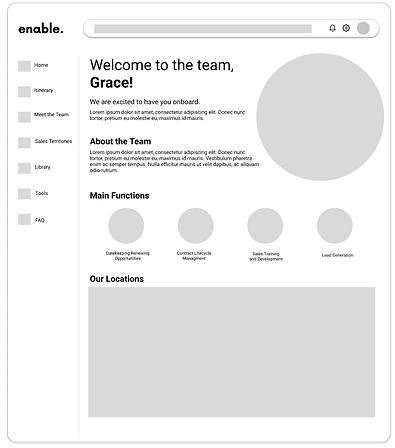
Initial design concept
Trainees
Trainers

Design testing
Concept testing
When trainers and trainees were asked about their overall impression of the product, they expressed satisfaction with the easy navigation because it helped them go through the task flow without confusion.
However, 4 out of 5 trainers and 5 out of 5 trainees expressed concern that although the initial designs allow easier self-training, there is still a gap in the real-time need for specific answers from managers/subject matter experts.
Also, during this stage, I learned that not all employees(ex. interns) had access to the platform we were utilizing, so enable needed to be on a website platform that was easier to access.
Proposed Design
Landing page for trainees


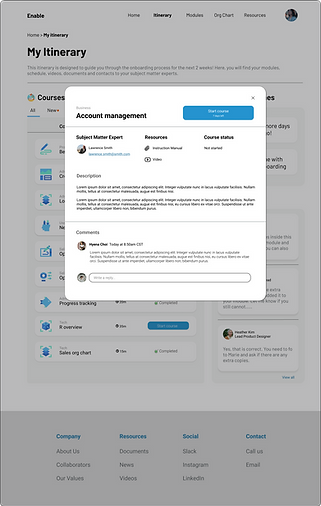
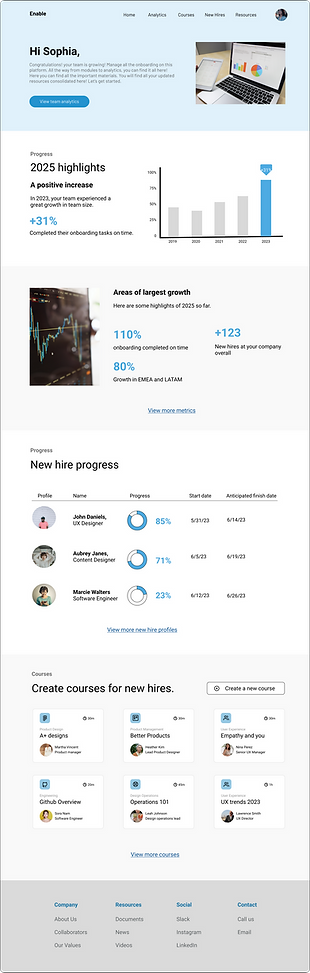
Homepage and details page for trainers


Impact
Influencing Future Direction
-
Expanding the team intern program/Recruiting
-
Adding learning & development content to onboarding
-
Increased productivity for the whole team and reduced onboarding time for new hires.
Next Steps
-
Track new hire Q&A frequency after two weeks.
-
Work with AI experts to create better recommendation systems
-
Additional user research with incoming global associates and explore localization strategies